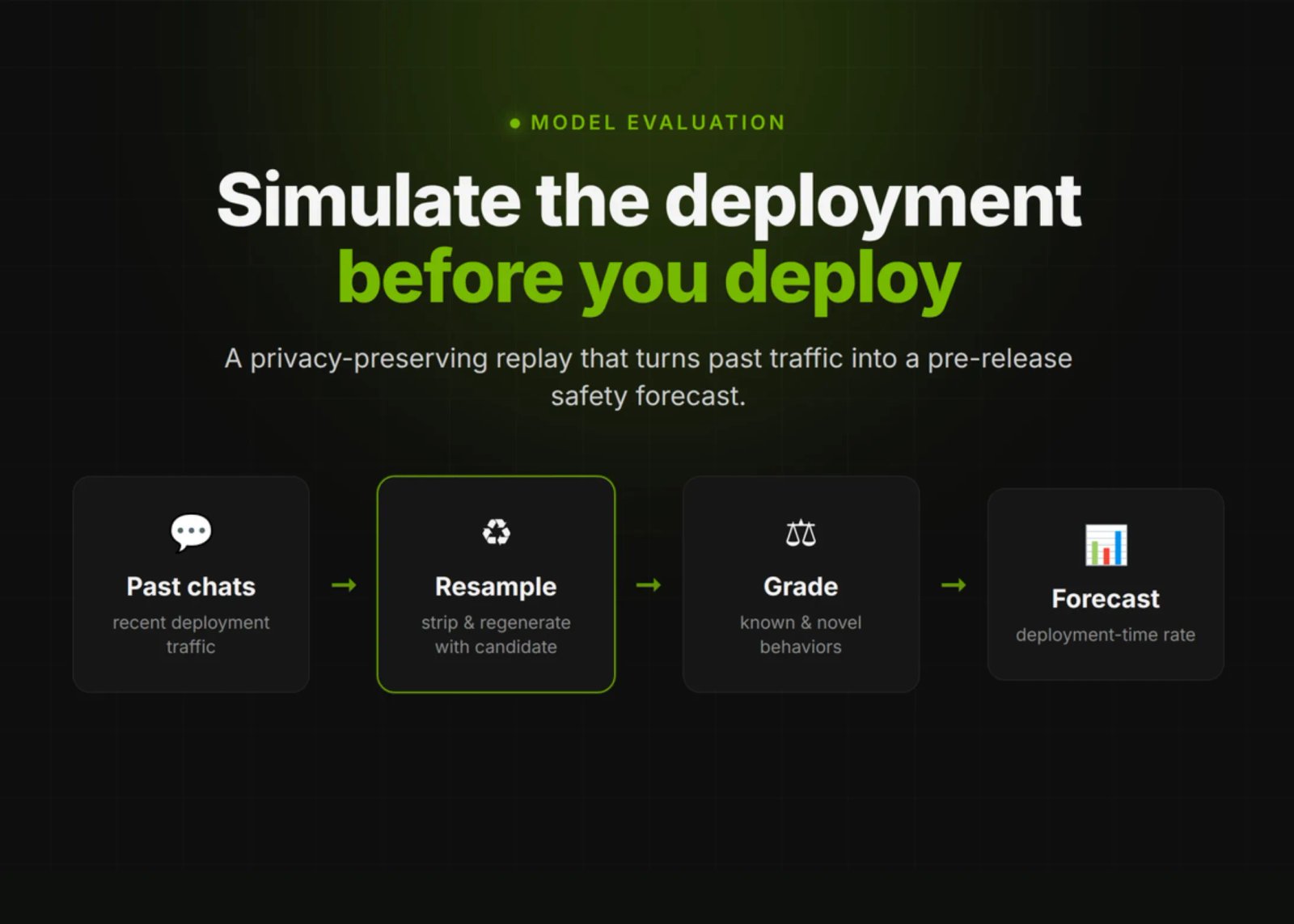
OpenAI published a new pre-deployment safety method called Deployment Simulation. The idea is direct. Before a model ships, simulate its deployment first. Replay past conversations through the new candidate model. Then study how it behaves in realistic contexts.
OpenAI already uses insights from the method during model development. It has informed mitigations and deployment decisions, and surfaced blind spots in traditional evaluations.
Deployment Simulation is a method for simulating a future deployment before it happens. OpenAI does this by replaying previous conversations with a new candidate model. The replay is privacy-preserving.
The technique is simple at its core. Take recent conversations from deployment. Remove the original assistant response from the older model. Regenerate that response with the candidate model to be released. Then evaluate the completions for new failure modes.
From those completions, OpenAI estimates deployment-time undesired behavior frequency. The same measurement can run after release on real traffic. That makes pre-deployment forecasts checkable later.
There is a floor. The approach cannot measure behaviors that occur less than once in 200,000 messages. It targets non-tail risks, not the rarest events.

Deployment Simulation Estimator
Interactive sandbox built on OpenAI’s June 16, 2026 method. Resample past chats, regenerate with a candidate model, grade, and forecast a deployment-time rate.
How often the behavior really occurs in live traffic, per 100,000 messages.
More resampled prefixes means wider coverage. Coverage scales with compute, not manual eval-writing.
Draws flagged messages from a Binomial(N, rate) process.
Flagged samples
—
grader hits in this run
Estimated rate
—
per 100,000 messages
Multiplicative error
—
OpenAI median was 1.5×
Detection floor
—
1 in 200,000 messages
True rate
Estimated
Set a rate and a compute budget, then run the simulation. Try a rare behavior at low compute to see the detection floor bite.
1
Take a recent production conversation
A de-identified chat from the previous deployment, kept privacy-preserving.
2
Remove the original assistant response
Strip the older model’s final answer, keep the user prefix intact.
3
Regenerate with the candidate model
The new model completes the same prefix, as it would in real traffic.
4
Grade the completion
Automated graders search for known and novel undesired behaviors.
5
Estimate deployment-time frequency
Aggregate flagged hits into a forecast that is checkable after release.
Watch one conversation move through the five stages.
Contains information related to marketing campaigns of the user. These are shared with Google AdWords / Google Ads when the Google Ads and Google Analytics accounts are linked together.
90 days
__utma
ID used to identify users and sessions
2 years after last activity
__utmt
Used to monitor number of Google Analytics server requests
10 minutes
__utmb
Used to distinguish new sessions and visits. This cookie is set when the GA.js javascript library is loaded and there is no existing __utmb cookie. The cookie is updated every time data is sent to the Google Analytics server.
30 minutes after last activity
__utmc
Used only with old Urchin versions of Google Analytics and not with GA.js. Was used to distinguish between new sessions and visits at the end of a session.
End of session (browser)
__utmz
Contains information about the traffic source or campaign that directed user to the website. The cookie is set when the GA.js javascript is loaded and updated when data is sent to the Google Anaytics server
6 months after last activity
__utmv
Contains custom information set by the web developer via the _setCustomVar method in Google Analytics. This cookie is updated every time new data is sent to the Google Analytics server.
2 years after last activity
__utmx
Used to determine whether a user is included in an A / B or Multivariate test.
18 months
_ga
ID used to identify users
2 years
_gali
Used by Google Analytics to determine which links on a page are being clicked
30 seconds
_ga_
ID used to identify users
2 years
_gid
ID used to identify users for 24 hours after last activity
24 hours
_gat
Used to monitor number of Google Analytics server requests when using Google Tag Manager