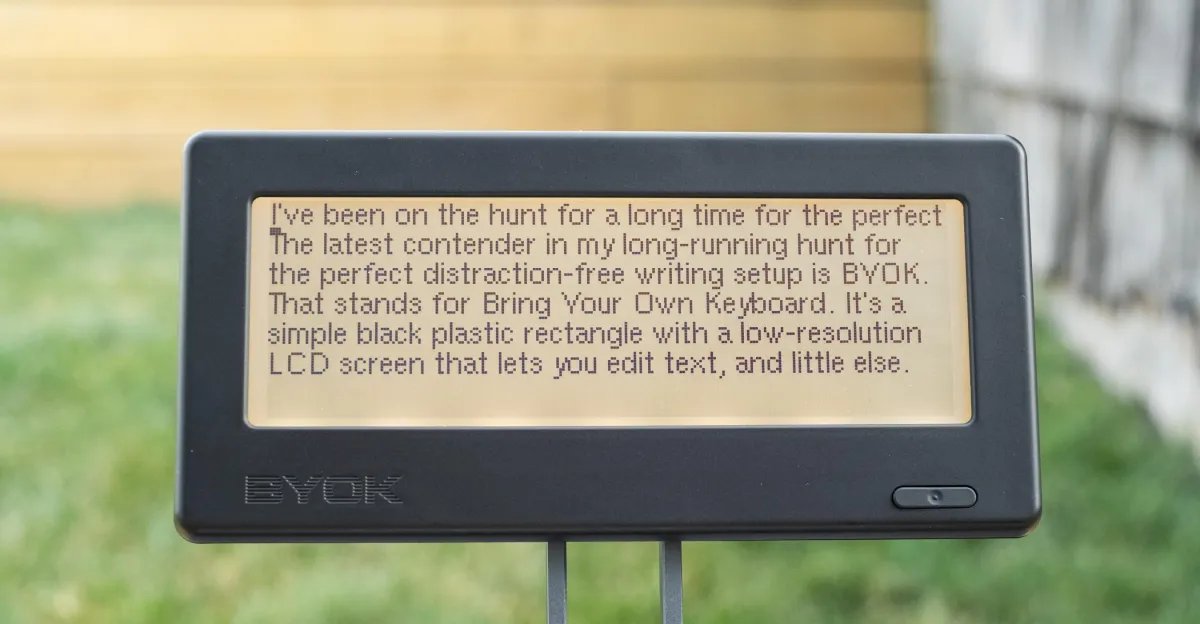
I have long been on the hunt for the perfect distraction-free writing setup. The latest contender is BYOK, which stands for Bring Your Own Keyboard. It’s a simple $199 black plastic rectangle with a low-resolution LCD screen that lets you edit text and does almost nothing else.
I’ve tried dedicated apps. I’ve even converted an old laptop into a writerdeck. But neither solution really clicked. Last year, I paired a Boox Palma with a NuPhy Air and there was a lot to like. The unique, quick-refreshing E Ink screen provided my favorite typing experience yet, and it synced seamlessly with my other devices thanks to Obsidian. But Boox’s OS is a bit janky, and the Obsidian Android app is messy. The interface is inconsistent, and you’ll want extensions to make the most of it, which you then have to remember to update, and hope that when you do, they don’t break anything. With BYOK, there are just a lot fewer variables to contend with.

$199
The Good
- Works with your favorite keyboard
- MagSage mount offers a lot of versatility
- Long battery life
- Reliable no-frills text editing
The Bad
- Low-res screen with uneven back lighting
- Bluetooth didn’t always auto-reconnect
- BYOK Studio is clunky
Unlike other distraction-free devices, like those from Pomera or Freewrite, BYOK doesn’t try to box you into a specific setup — this is great news if you’re picky about your keyboards. It’s not a stripped-down laptop or trying to re-create a vintage typewriter form factor. There’s no keyboard that it has to stay attached to. It’s just a box. With the right accessories, it has the potential to be much more ergonomic than the competition. The MagSafe-compatible ring on the back lets you use it with a variety of stands, mounts, and holders. You could skip a stand and just stand it up straight on your desk, or lay it down on a table top, but I wouldn’t recommend it.
The company sent me a few different stand options to test with the BYOK, ranging from simple collapsible rings to cumbersome gooseneck stands. I’ve primarily used a folding tripod stand from Ulanzi. It’s not the most stable, but I’ve found it offers the best balance of portability and height, limiting strain on my neck. You could also use a stack of books or an easel, or just have a friend hold it, though that’s a little less convenient.

This customizability is part of the appeal of BYOK. I’ve also tested BYOK with a number of keyboards, both wired and Bluetooth, from palm-sized ones reminiscent of a Blackberry to the luxurious MQ80 from Iqunix. The latter definitely provided the nicest typing experience, but its heavy aluminum chassis made dragging it around unpleasant, so I tended to stick with my trusty NuPhy.
The software on the BYOK is delightfully stripped down. You have projects (essentially folders), and inside those are files. Most of the keyboard shortcuts you’re used to in any standard text editor work: CTRL+F to find inside a document, CTRL+C to copy, CTRL+V to paste, et cetera. You can also quickly pull up a status bar with your word count and battery info. You can also insert notes, tasks, and a few other content types by adding “::” and a keyword to the start of a line (i.e., “::note”). But that’s kind of it. No links. No bold or italics. Just text.

I could nitpick about the uneven backlight or the Bluetooth that didn’t always automatically reconnect to my keyboard. But for the most part, the hardware is rock-solid. Battery life is quoted at 20 hours (five with the backlight at maximum) and, in my testing, that seems to be a slight underestimation, if anything. I used it on and off for more than two weeks before I needed to recharge. And while the navigation buttons on the back of the device are a little awkward to use, you don’t really need them once you’ve got a keyboard hooked up.
This sort of reliable simplicity is exactly what I need to keep me focused while writing. I wrote three reviews (including this one) and two short stories on the BYOK in the time I’ve had it. It’s particularly well-suited for my recent return to fiction writing.
It’s not ideal for everything, however. It would only slow me down on the daily news grind, or anything where I’m relying heavily on research and pulling from other sources. Unsurprisingly, it’s a lot more annoying to switch devices than it is to switch windows or tabs. It’s also not great for heavy-duty editing. I find BYOK excellent for focusing on getting my thoughts down, but the moment I start trying to jump around a document and make changes, it gets a little wonky. You’re better off drafting on BYOK and then moving to something like Google Docs to edit and format.

Getting your documents on Google Docs is simple enough. All your files are saved as plain .txt on a microSD card, which you can pop into a reader. Or you can connect the BYOK directly to your computer over USB-C to transfer files. But there is also a cloud sync service and app called BYOK Studio that will even back itself up to your Google Drive. The basic text sync function works reasonably well. While it’s supposed to sync automatically over Wi-Fi when powering off, I’ve found it best to manually sync when you finish a writing session, just in case.
Things get a little messy with the other formats that a premium BYOK Studio subscription ($9.99 a month or $83.88 billed annually) enables, including cards, wikis, story grids, and manuscripts. The way notes, tasks, and all of these other features are implemented on the device is thoughtful. A simple “::card” turns a line into a card, “::wiki” makes a wiki entry. And you can route them using @tags, so all your “@characters” and “@plot” notes end up in the right place. But they also complicate the experience, and plain text on a low-res LCD is not the ideal interface for them.

They’re much better experienced on the web interface on your computer or in the mobile app. Though, even there I find the UI a bit unintuitive at times and crowded. While I understand the appeal of having a single destination to handle all these aspects of writing, I already have Obsidian, and it does them better. Where Obsidian had been letting me down was as a portable distraction-free writing environment. (Though, if I could just sync a specific vault or folder to the BYOK, that would be the perfect solution.)

The company recently raised the BYOK’s price to $199 from $179, but it’s still a far cry from Freewrite’s cheapest device, the $349 Alpha, or the $549 Pomera. Obviously, you need to provide your own stand and keyboard, but if you already have a keyboard you love, why spend extra on a device with a worse one built in?
For 99 percent of people, BYOK may seem frivolous. But if you, like me, struggle to stay on task and you want something to write on without the constant temptation of the internet at your fingertips, the BYOK’s allure is obvious.