
I am a movie buff. I love watching movies and discovering new ones outside my native language. One of the best ways to discover new movies is on Instagram or TikTok. There are a lot of profiles that post eye-catching movie scenes that instantly make you stop and watch. However, the problem is that you only get to see that particular scene, and many times, the profile does not mention the movie name. Even the comments section does not have a clue from which movie the scene is taken from.
I used to spend time typing wildly specific scene descriptions into Google, just hoping for a match, which rarely worked. My curiosity made me wonder if there is a music recognition app like Shazam, and if there is any app that can help me with movies? My research introduced me to Voola, and it changed the way I discover movies and TV shows.

How I Use This Movie Review Aggregator to Find New Movies to Watch
Anyone who has ever struggled to find something (anything) to watch on their favorite streaming service(s) should use this site.
Voola is the magic sauce
It lets you discover movies from the clip you saw on Reels

The closest app that can help you understand what Voola is and what it does is Shazam. When you come across great music either in a café or a mall, you open the Shazam app, hold it in a position so that the speakers can listen to the song, wait for a few seconds, and bam — Shazam tells you exactly what song is playing.
This is so convenient because you don’t have to chase your friends or the person playing the music to know which song they are playing that you cannot get out of your head. Voola does the same thing, except instead of songs, it identifies movies and TV shows.
The best part is that it can even help you discover the actors of the movie from a short clip. You open the app, feed it a clip from TikTok, Instagram Reels, YouTube Shorts, or X, and within seconds, Voola starts to analyze the footage.
Once done, it spits out the movie title, cast, and everything else you’d want to know. It sounds simple, but it is a blessing for someone who watches a lot of movies or wants to discover titles that they find interesting.
It eliminates the need to ask or send multiple comments just to get to know the name of the movie or TV show. Most of the time, the profile never replies to your comments, and you are left in limbo. With Voola, you can take matters into your own hands and let your phone’s camera (plus the app) do the heavy lifting.

- OS
-
Android
- Price model
-
Free and Premium
Voola is a visual recognition app that lets you identify any movie, TV show, or celebrity in seconds — just share a clip from TikTok, Instagram, YouTube, or record one yourself. Beyond identification, it doubles as your personal entertainment hub, letting you save titles to a watchlist, organize them into custom lists, and instantly see where to stream them.
Voola’s magic is straightforward
You record, upload, or paste the link and get the movie info
Voola gives you three ways to throw clips at it, and all of them are dead simple. You can either record a video, upload from your gallery, or paste a link straight from any social media platform.
If you are watching something on your TV or laptop, you can open the app and hit the record button. Voola will use your phone’s camera to grab a few seconds of whatever is on the screen. If you have saved a clip, and it is there in your phone’s gallery, then you can upload it directly.
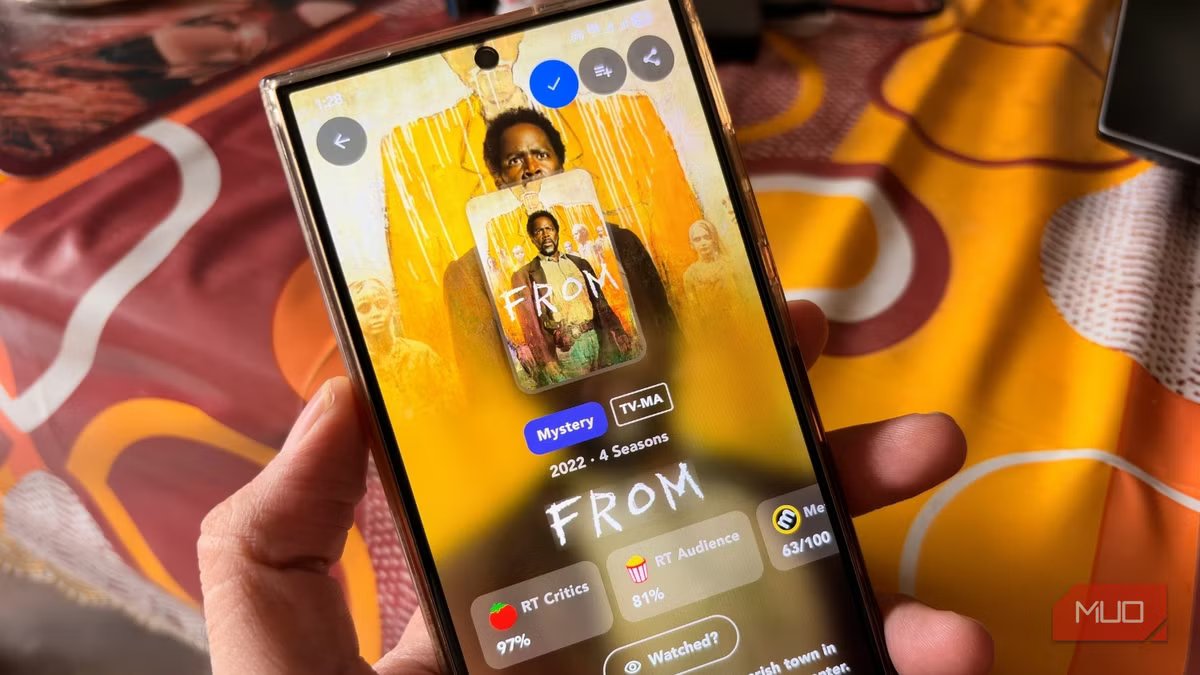
Lastly, if someone sent you a link to a Reel, TikTok video, YouTube Shorts, or a video on X, you can paste the link directly into Voola and get the info. For testing, I pointed my phone’s camera at my laptop mid-episode of a show I am currently watching — From on MGM+, which is probably the best horror series that you can watch right now. Within a few seconds, Voola came back with the correct title, cast list, and all other information about the show.
The best part about Voola was that neither the clip nor the angle were the best angle on the content. I just hit record and let Voola analyze what’s there on my laptop. It gives you correct info because it has an identification engine known as content fingerprinting.
Voola’s algorithm scans the visual and audio elements from your screen, then cross-references them with its own database. It covers everything from mainstream blockbusters to anime, indie films, and even TV shows. While accuracy is not 100%, for me, I have never experienced a mistake with this app.

12 Free Movie Streaming Sites With No Sign Up Requirements
Want to watch a movie without the hassle? Use these sites which are free, legal, and require no registration.
Simple features make it stand out
It is a complete movie hub

When you open the app and tap on the big magnifying glass button, you get two options: Movie and People. Tapping the Movie button lets you identify a movie or TV show from a clip or link. But there is another button called People.
Have you ever stared at your TV screen, pointing at an actor and thinking, “I have seen this guy in another movie but can’t remember their name.” We have all been there. With Voola, instead of frantically scouring the web for the movie or TV show cast list, you can use the People mode. All you need to do is snap a picture or upload an image of the actor’s face, and the app instantly gives you the name of that actor.
Additionally, aside from showing you titles, Voola shows you aggregated scores from Metacritic, IMDb, Letterboxd, Rotten Tomatoes, and TMDb. This way, you can decide if two hours of a movie is worth your time or not. You can even watch the official trailers directly in the app, negating the need to head over to YouTube.
Finding which streaming service has your favorite movie is another task. Thankfully, Voola lists all the available streaming platforms where the identified title is available right now. You can find this information under the Where to watch section beneath the ratings.
There is also a dedicated Trending Media section, where you can scan through all the movies and TV shows that Voola users are currently scanning. The identified movies and shows can also be saved to a Watchlist with one tap, which is a better way than installing a dedicated watchlist app. You can also create a custom list and organize titles based on genre, mood, etc.
It is free, but you can pay
The best thing about Voola is that the free version is quite generous. In previous versions, the app limited how many clips you could scan per day, but recent updates have removed these limitations. You do get banner ads within the app, but they sit unobtrusively at the bottom of the interface and do not interfere with the UI of the app.
If you want a clean UI, then you can opt for the premium version that completely removes ads and gives you access to background scanning and a direct Share to Voola feature from the Android Share menu. In my opinion, the free version is more than enough, as once you know the title, you will most likely close the app.
We consume so much social media content every day that we come across so many great scenes from movies that various accounts put forward. Instead of letting the movies slip away through your fingers, you can simply share the image or link with Voola and get the title. No need to beg for the movie name in the comment section.



