
The Ultimate Playbook for Google Business Profile Suspensions
TL;DR
-
Two types of GBP suspensions: Soft suspensions leave the listing visible but unverified, while hard suspensions remove it entirely from Google Search and Maps, often causing major drops in calls and leads.
-
Common suspension triggers: Frequent profile edits, duplicate listings, using virtual/PO box addresses, lack of a real business location, or operating in spam-heavy industries like locksmith or garage door services.
-
User and account issues can cause suspensions: A suspended Google account (e.g., from spammy edits or Google Ads violations) can suspend all Business Profiles managed by that account.
-
Best practices to avoid suspension: Make changes slowly, use a domain-based business email as the primary owner, avoid redirect URLs, and ensure your business has a legitimate physical presence.
-
Reinstatement requires proof and patience: Appeals must be filed through Google’s appeals tool with documentation (licenses, utility bills, photos, video walkthroughs), and responses can take 1–6 weeks.
Getting your Google Business Profile (GBP) suspended can be a frustrating challenge because Google generally doesn’t provide any useful details about what you did wrong. Further, it’s also possible that the suspension wasn’t triggered by Google in response to your profile violating the Guidelines! Any Google user can report a profile on Google Maps. Depending on the trust level of that user, and the supporting evidence Google can find online (or lack thereof), that suggested edit can have your Business Profile suspended. (In other words, removed from Maps.)
Two Types of GBP Suspensions
Google Business Profile Soft Suspension
The first type of suspension is a soft suspension. This is when you see the “suspended” label on the profile and in the Business Profile Manager but your listing still shows up on Google Search and Google Maps.
You can find a soft-suspended profile on Google if you search for it by name (or name + address). It will likely show up for generic, unbranded search terms too and the profile will still display all your reviews! In fact, a soft-suspended profile usually does not experience any significant change in rankings. So, a soft suspended profile can continue to drive leads and collect reviews.
In this case, the profile has just become unverified. Since you broke Google’s guidelines in some way, they have removed your ability to manage the listing. It shows up on Google without an owner (i.e. unclaimed) so the listing will show a “Claim this business” link when viewed on Maps. (This applies to storefront businesses only. SABs do not have this link.)
Google Business Profile Hard Suspension
With a Hard suspension, the listing is removed from Google Search and Maps. It does not show up for any searches. The profile is effectively gone.
For many businesses, a hard suspension can result in a large decline in phone calls and, as a result, a significant drop in revenue. The consequences can be severe: I worked with a multi-location plumbing business that closed one of its locations—putting 10 plumbers out of work—after a hard suspension caused incoming calls to dry up.
Hard suspensions can be triggered by several methods.
- Algorithmic – Profile Edits: Edits to a profile can trigger a suspension, especially if the business category is spammy, such as locksmiths or garage door suppliers.
- Algorithmic: A listing can be suspended for no apparent reason, even without making any edits. Google likely does this as a quality control measure: spammy profiles get removed from Maps and only eligible profiles will be able to get reinstated. Unfortunately, this “guilty until proven innocent” approach is hard on real businesses.
- Google Employees: Google can manually remove your listing at any point if they feel you violate their guidelines. This used to happen frequently in the support forum when people could report listings as spam and Google would remove them.
- Google Users – Suggest An Edit: Using the “Suggest an edit” option, Google Maps users can report a listing as “Spam” or “Doesn’t Exist”. If the edit gets approved, the profile gets suspended.
- Suggested edits can be approved and go live immediately if Google has enough trust in the user account. Sometimes the suggestion will need to be corroborated by other Google users via the Google Maps app or Check the Facts. Sometimes a suggestion is manually reviewed by Google, which can take a few days or even a few weeks.
- Google Users – Business Redressal Complaint Form: Users can also report a listing to Google using the Redressal Form.
In the case of a hard suspension, Google has determined that the business is not eligible to be on Google Maps and so the listing is removed completely. On the other hand, in the case of a soft suspension, the listing remains live on Maps, indicating that Google believes the business exists and is eligible to appear on Maps.
Business profiles that violate certain guidelines are likely to experience a hard suspension eventually. Some examples of profile violations that could trigger a hard suspension include:
- Creating multiple profiles for the same business/location
- Or, multiple profiles for a service area business
- Using a PO Box, mailing service, or virtual office as your address
- Creating a profile for an online-only business that doesn’t have in-person contact with customers
- Creating a profile for a business that runs a service or class at a location you don’t own or have the authority to represent
- E.g. An AA group meeting in a donated space such as a church or community center
But it’s not just details of the Business Profile that can cause problems. Google may issue a hard suspension in response to user behaviors, such as:
Profiles in certain industries, such as locksmiths and garage door, get suspended far more frequently than others. While it’s not described anywhere in the Help Center documentation, it’s clear that some industries are more sensitive to getting suspended than others.
Note: “soft suspension” and “hard suspension” are terminology coined by Joy Hawkins. They are not “official” Google terms and agents might not understand what you mean if you use them in your communication with the support team.
How Do I Know if I Have Been Suspended?
As of July 13, 2020, Google started sending out notification emails to owners and managers of a Google Business Profile that gets suspended. Greg Sterling wrote about the reason behind these notifications in this Search Engine Land post.

When Google rolled out the new appeals tool in early 2024, the email notifications were updated to include the reason why your profile was suspended and a link to a more detailed support article. In most cases, the explanation is vague and the support article simply lists a number of policies you might have violated instead of providing any real guidance. In practice, this new email format is, in most cases, no more helpful than the old format.

Because Business Profile notifications aren’t very reliable, it’s also a smart idea to do regular spot checks inside your Google Business Profile Manager. Select the “Suspended” filter to review any suspended listings in your account.

The Top 5 Reasons Why Listings Get Suspended
We regularly help businesses get suspended profiles reinstated. While Google does not provide much detail about the cause of a suspension, we have determined these to be the top reasons why Google suspends listings:
- You made too many edits to important parts of your profile. Google finds this suspicious. It might sound strange, but this is actually by design. Google has this trigger in place to protect listings that get hijacked by nefarious users, who tend to make a bunch of edits as soon as they get control of a profile.
- Your business doesn’t have a physical presence at the address you used. (E.g. PO box, virtual office, coworking space, etc).
- One of the managers or owners on your profile had their Google account suspended. (See more on this below.)
- You have multiple listings for the same business.
- You’re in a spammy industry. (If you work in an industry that is littered with spam, suspensions are so common that they should be expected.)
Why Does Google Suspend User Accounts?
Quite often, suspensions happen because there is an issue with one of the user accounts managing the profile, not because the Business Profile itself is violating any guidelines. A common example: an SEO company with bad practices working with legitimate businesses. The SEO company’s user account gets suspended for violating Google policy, causing ALL the Business Profiles that account has access to to get suspended.
The impact of an account suspension can be HUGE! For those working for a large, multi-location brand or managing profiles at an agency, an account suspension can cause dozens or even hundreds of Business Profiles to get suspended all at once.
Account suspensions can be triggered by a series of “spammy” edits on Google Maps. If enough of your edits are denied, your account will be flagged as a spammer, triggering an account suspension, or in Google’s terms, “restriction”, and all the listings you manage will get suspended.
Years ago, Joy Hawkins concluded this after talking to several users and analyzing what actions they took right before the suspension happened. Joy was correct! Today, Google describes account “restrictions” in Help Center documents and even provides some guidance on fixing the problem.
Additionally, Google also confirms that an account suspension on another Google product may result in the suspension of the associated Business Profiles. We see this with clients or agencies using the same email account to manage Google Ads campaigns and Business Profiles. A Google Ads policy violation triggers an Ads account suspension which leads to a Business Profile suspension.
Please see the section on avoiding suspensions (below) for suggestions about editing on Google Maps to avoid suspensions like this.
To clarify the impact of a user account suspension, or “restriction”, on Business Profiles:
- When a user account is restricted, ALL the Business Profiles on which that account is a user (manager or owner) are suspended.
- When a Business Profile is suspended, all users on that profile see it as suspended.
- If the listing remains publicly visible (i.e. soft suspension) the public will see it as unclaimed/unverified, not as suspended.
- When an account suspension causes multiple Business Profiles to be suspended at once, the profiles may see a mix of hard and soft suspensions.
- The reason for this is unclear. It may depend on how bad Google finds the user violation or how much trust Google has in the existence of each of those businesses.
- If a single location in your Business Profile Manager receives a suspension but the rest of your listings are fine, it’s possible that one of the other users on that profile received an account suspension. In these cases, simply removing the suspended user prior to submitting an appeal is faster than trying to fix the account restriction.
- You might be able to determine which account is responsible by having each user check their status with the Review service restrictions tool. The tool can fail to report a restriction even in cases where there is one. However, it’s a good place to start because if you find a restricted account you can trust that it’s part of problem.
- If the tool does not find any suspended accounts, you have to try to figure it out yourself by asking each individual user if all the listings in their Business Profile Manager are suspended. (If the answer is yes, they are the culprit).
- For example, let’s say Bob the Plumber notices that his listing is suspended. The marketing agency he hired is a manager on the profile and that agency recently received an account suspension, so all the listings they manage got suspended. Bob can remove the GBP agency from the list of users and submit an appeal, to get his profile back on Google quickly. The agency, on the other hand, has to figure out what caused the account suspension and fix it.
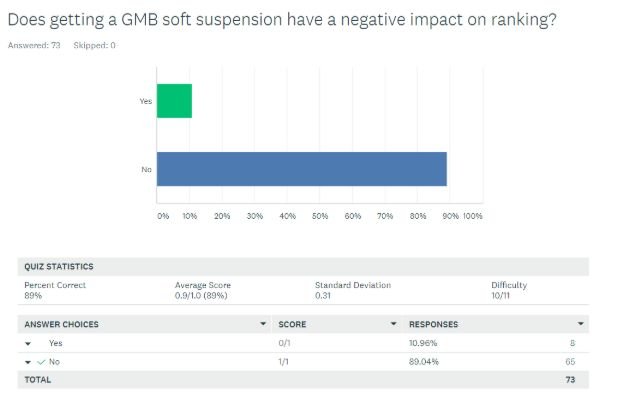
Do Suspensions Impact Ranking?
We have found getting either type of suspension has not shown to have a negative impact on ranking if the listing gets reinstated reasonably quickly. All other things being equal, the profile will return to the same ranking positions it had before the suspension. On the other hand, if the profile is suspended for several months in a competitive market, the profile will be reinstated into a different SEO landscape and will likely see a change in rankings. However, it is different from organic penalties in that there is no “recovery” period.
I’ve seen cases where the local rankings dropped after reinstatement, but this was due to an error by the Google Business Profile support team. In these cases, the reinstated listing was connected to a new CID number so the listing was treated as a brand new profile.
We had an account suspension in 2021 when a Sterling Sky employee had his Google Workspace account suspended. It caused soft suspensions for about 2 dozen listings and a hard suspension for Sterling Sky’s profile! It turned out that the account was wrongly suspended; it was fixed within a few days. Our findings were that rankings bounced right back to where they were before, for both the hard and soft suspension. Screenshots below.

We also did a survey at a LocalU Advanced event to poll the audience to see what others thought about this. Here are the results of that:

Why is Google Business Profile Support Telling Me to Create a Duplicate When I Got a Suspension?
We have had several users say that after having their profile suspended, the support team told them to create a new listing. The wording of the email from Google is definitely confusing:
“I would like to inform you that the existing business page under the account cannot be reinstated. Therefore in order to make the business page live on Google you need to create & set up a new business page for the location and get the page verified.”
However, Google support does not want users to create an entirely new listing. The badly worded message intends for users to start the process of creating a new profile. Once users enter the business name, a drop-down will appear, prompting them to claim their existing listing. In the end, the user claims the existing listing on Google Maps, and does not actually create a duplicate.
Should I Recreate the Listing?
No! The suspended listing has some ranking power. A new profile has no history and no ranking power. Additionally, a new profile won’t have the photos, posts and reviews found on the suspended profile. (Only a Google employee can transfer the reviews.)
So, take the time to submit an appeal. It’s worth the effort required to reinstate the profile, even if that includes turning to the support community or hiring a reputable agency. Only create a new profile when there is no other option.
How to Avoid Suspensions
- Don’t make multiple edits at the same time. For example, if you’re optimizing a profile, don’t change the categories, rewrite the business description and fill out the attributes all at the same time. Instead, make one change a day over several days. This is particularly true in spammy industries such as locksmiths, drug rehab, garage door and personal injury attorneys.
- Use a domain-based email for the primary owner, not a Gmail address. When the primary owner email address is on the same domain as the business URL, it confirms to Google that the profile owner is associated with the business; it’s a trust signal. If you work for an agency, your account should be a manager and the business owner should be the primary owner, using a domain-based email. The primary owner should not be a Gmail.
- Don’t make Google Maps edits with the same address you use to manage Google Business Profiles. If your Maps edits lead to your email account getting flagged, all the Business Profiles managed with that account will get suspended. Google gets this wrong a lot. Joy knows a Level-10 Local Guide and former MapMaker Regional Lead (the highest level of trust for users on Maps) got an account suspension because Google incorrectly flagged some of his edits. At Sterling Sky, we make Google Maps edits using Gmail accounts, not work emails that are connected to our Google Business Profile agency account.
- Don’t link to a URL that redirects. This can trigger an automatic suspension.
- Don’t link to a YouTube channel in the website field. This can also trigger a suspension.
Filing For Reinstatement
As of February 2024, the only way to get a listing reinstated is to use the Google Business Profile appeals tool. If you try to contact Google via any other method, they will just redirect you to that tool.
Before you submit an appeal, make sure you do the following:
- Add any photos or videos of your business that proves it’s real to the listing. (Awesome tip from Ben Fisher.) Include photos of:
- The inside of the office showing clear signs.
- Photos of your trucks/vehicles that show your branding if you have them.
- Photos of any business licenses that are verifiable online.
- A video walkthrough of your office starting with the outside of the building so that Google can confirm you’re located where you say you are.
- Make sure you review all the users on the account (both managers and owners) to ensure you removed any that could possibly have an account suspension.
- Prepare your documents. The more proof that your business exists at this location that you can provide, the better. That said, aim to stick to the four types of documents Google asks for:
- Business registration
- Business license(s)
- Tax certificates
- Utility bills for the business (e.g. Electricity, Phone, Water, Internet)
Once you submit the appeal, you will not be issued a Case ID, nor will you get an email confirmation. You simply have to wait for a response.
The wait time is normally about a week but this can vary significantly. If Google changes something with the algorithm and there are a lot of suspensions happening at the same time, the appeals tool response time can become very long. In the last half of 2022, wait times were 3 – 5 weeks. In early 2025, they were 5 – 6 weeks!
Case Study: Why Reinstating a Suspended GBP Listing Isn’t Always the Best Choice
The Challenge
A local service-based business managing two Google Business Profiles (GBPs) encountered a setback when one of its listings—created specifically to target gate-related keywords—was suspended. With GBP playing a critical role in local visibility and customer acquisition, the suspension prompted urgent concerns about lost traffic and leads.
Our Approach
During an SEO audit, the suspended listing was assessed to determine whether reinstatement was the best path forward. Technically, reinstating the listing was possible with the proper documentation and verification of the business’s location and services. However, several key factors led to a strategic recommendation not to pursue reinstatement:
- No Dedicated Category for Gate Services
Google does not offer a specific “gate contractor” category. The suspended listing would have needed to rely on the overlapping category “fence contractor,” making it difficult to differentiate it from the main GBP. - Risk of Internal Competition and Filtering
Reinstating the gate-focused listing would likely create overlap with the main listing. In many cases, Google filters out one of the listings when multiple profiles from the same business compete for similar keywords in the same geographic area. This could harm the visibility of both profiles.
Tactics Implemented
- Optimized the Main GBP to Cover All Services
Rather than reinstating the suspended listing, the strategy shifted to enhancing the main profile to fully reflect both fencing and gate-related services. - Expanded Category Coverage
The main GBP was updated to include relevant categories such as “fence contractor,” “welder,” and “iron works,” ensuring coverage of a broad keyword range, including gate-related queries. - Detailed Service Listings
Specific services like “gate installation” were added under appropriate categories to make the GBP more comprehensive and keyword-relevant. - Cleaned Up Irrelevant Auto-Added Services
Irrelevant services automatically added by Google (e.g., “temporary fence” or “waste management”) were reviewed and removed to maintain clarity and accuracy.
The Results and Key Takeaways
By focusing on strengthening a single, fully optimized GBP, the business maintained strong visibility for both fencing and gate-related searches. The simplified, consolidated profile reduced the risk of filtering and positioned the business more effectively in local search results.
Reinstating a suspended GBP isn’t always the smartest move—especially when the listing lacks distinct category support and risks competing with a stronger main profile. In this case, consolidating efforts around a fully optimized primary GBP delivered better long-term value and search visibility.
Need help with a reinstatement? Or, unsure if you should reinstate? Let us know!
This article was co-written by Joy Hawkins.
