In this article, you will learn how the Model Context Protocol (MCP) standardizes the way AI applications connect to external tools and data sources, broken down across three levels of depth.
Topics we will cover include:
- Why connecting models to external systems without a shared standard creates an integration problem that grows with every new client or tool.
- How the host, client, and server work together, and what happens when a model’s request flows through an MCP server.
- The transport options, security risks, and deployment choices that matter once an MCP server is running in production.

Introduction
Every large language model has the same limitation baked in: its knowledge stops at training time. Ask it about a file on your machine, a row in your database, or an email that came in this morning, and it either halts or guesses. The model is sealed off from the systems your application actually runs on, and bridging that gap falls entirely on the developer.
The usual approach is to write custom integrations — a function here, a tool definition there — that pipe external data into the context window. That works at a small scale. But once you’re connecting multiple models to multiple services, you end up maintaining a matrix of one-off adapters, each with its own auth logic, schema assumptions, and failure modes. Adding a new model or a new service means reworking that whole matrix again.
The MCP is an open standard, introduced by Anthropic, that gives this problem a cleaner shape. Instead of every AI application building its own connectors to every external system, both sides implement a shared protocol. A service exposes itself as an MCP server once, and any MCP-compatible client can use it.
This article walks through how MCP works at three levels: why the problem exists and what MCP’s core idea is, how the architecture fits together and what a request looks like, and finally the transport, security, and deployment decisions that matter when you take it to production.
Level 1: Why MCP Matters
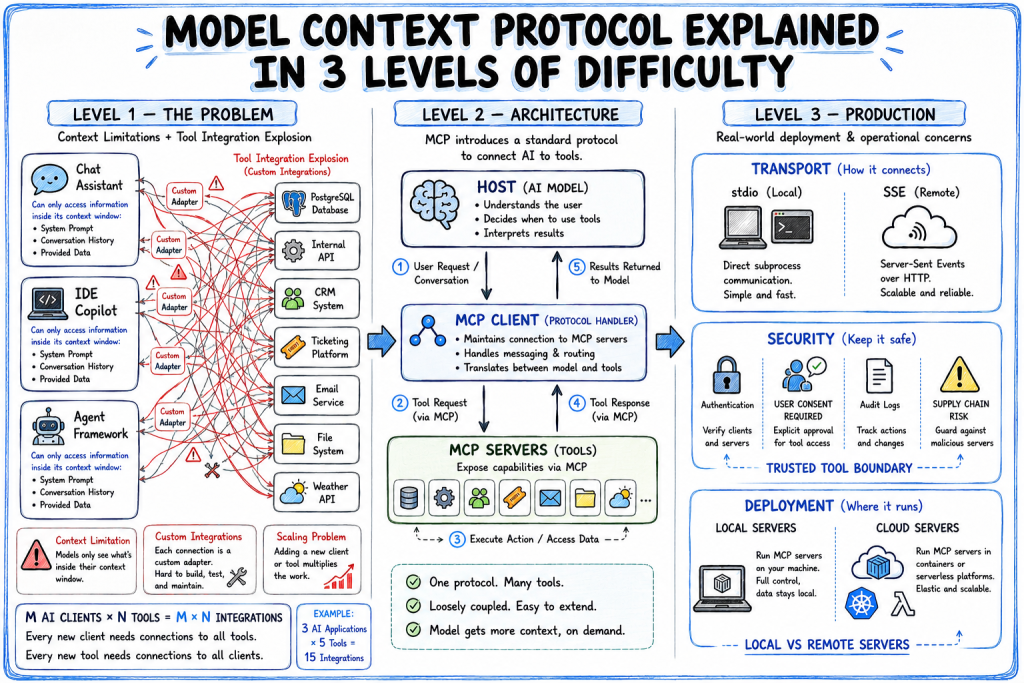
A model can only work with information available in its context window: the system prompt, conversation history, and any additional data provided during the interaction. Accessing information outside that context requires external tools.
Most AI systems support tool calling. When a model requests a tool, the application executes the request, retrieves the required data, and returns the result to the model. This allows models to interact with databases, APIs, file systems, and other external systems.
As the number of AI applications and external tools grows, integration complexity increases. Consider:
- M AI clients (chat applications, IDE assistants, agent frameworks, model providers)
- N tools and data sources (databases, APIs, internal services, SaaS platforms)
Without a shared standard, each client typically requires its own integration with each tool. The number of client-tool adapters can therefore grow as M × N.
For example, if three AI applications need access to five internal tools, you may end up building and maintaining fifteen separate integrations. Adding a new tool requires integrating it with every client. Adding a new client requires integrating it with every tool.
The Problem That MCP Solves
MCP provides a standard way for AI applications and external systems to communicate.
AI applications implement the MCP client specification. Tools and data sources expose capabilities through MCP servers. Because both sides follow the same protocol, an MCP server can be used by any compatible MCP client without requiring a custom integration for that specific client.
Instead of building a separate adapter for every client-tool pair, each client implements the MCP protocol once and each tool implements it once. The integration surface shifts from approximately M × N custom adapters to M + N protocol implementations.
The practical result is a more composable ecosystem. An MCP server that exposes a PostgreSQL database, internal API, or ticketing system can be used by multiple assistants, IDEs, and agent frameworks through the same protocol rather than through separate integrations for each platform.
Level 2: MCP Architecture and How a Request Flows
MCP interactions involve three parts: the host, the client, and the server.
The Host
The host is the application the user actually talks to. This can be a chat interface, an AI-powered IDE, or a custom agent. It contains the language model and drives the conversation. When the model decides it needs to reach out to an external system, that decision originates here.
The Client
The client sits inside the host and handles protocol mechanics. It maintains a registry of available MCP servers, translates the model’s requests into properly formatted MCP calls, dispatches them to the right server, and converts responses back into something the model can use. From the model’s perspective, it just asks for things. The client handles the plumbing.
The Server
The server is your bridge to an external system. It registers its capabilities — what tools it offers, what data it can provide — and responds to requests from clients. A server sitting in front of a database takes a structured tool call from the client, runs the appropriate query securely, and returns results in a format the model can work with. The server owns all the implementation details of that system; the client and model only see the MCP interface.
MCP Host, Clients, and Server
Tracing a Request
Say a user tells an AI assistant: “Grab the Q2 revenue numbers from the database and put together a summary for the team.”
The model sees it needs two things it can’t do on its own. The client checks its registered servers and finds a database_query tool and an email_draft tool on two separate MCP servers.
The model calls database_query with the relevant parameters. The server runs the query, formats the results, and sends them back through the client to the model. Now working with real numbers, the model calls email_draft — recipient list, content, subject. The email server handles the rest, confirms success, and the model tells the user it’s done.
Neither server knew anything about the other. The model coordinated the steps. The client handled protocol translation the entire time. The developer didn’t write any glue code between the model and either system.
Tools, Resources, and Prompts
MCP servers expose three kinds of capabilities:
- Tools are callable functions. The model invokes them to take action or retrieve computed results.
- Resources are readable data the model can pull in as context: files, records, documents.
- Prompts are reusable templates the server provides, useful for standardizing how your organization wants the model to approach certain tasks.
The distinction between tools and resources matters operationally. Reading a resource is a passive, relatively low-risk operation. Calling a tool that writes to a production system is a different category of action entirely. Keeping them separate lets you apply different authorization policies to each.
Level 3: Transport, Security, and Where MCP Runs
Once the architecture makes sense, the remaining questions are the ones that decide whether an MCP deployment holds up outside a demo: how messages physically move between client and server, what can go wrong when a server is untrustworthy, and where the server itself should run.
How Client and Server Actually Talk
MCP splits communication into two layers, and it’s worth understanding them:
- The data layer is the actual protocol: it is JSON-RPC 2.0 underneath, and it defines the connection lifecycle plus the primitives we discussed earlier.
- The transport layer is just the pipe those messages travel through to get from client to server.
Two servers exposing identical tools can run over completely different transports without the data layer caring at all; that separation is what lets MCP swap one for the other without touching how any tool behaves.
MCP currently defines two transports:
stdiois for local servers. The client launches the server as a subprocess and the two talk over standard input and output. It’s simple, fast, needs no network setup, and keeps everything on one machine. This is a good fit for IDE plugins, local file access, and anything running alongside the host.- Streamable HTTP is for remote servers. The client and server exchange JSON-RPC messages over a single HTTP endpoint that supports both POST and GET, with the server optionally using Server-Sent Events to stream multiple messages back, which is useful for long-running calls and server-initiated notifications.
The Trust Problem and Security Constraints
MCP gives a model real reach into databases, inboxes, or anything a tool touches. Most of the actual risk comes from authentication plumbing, which is what the MCP security best practices page outlines:
- A proxy server that reuses one fixed client ID and trusts a leftover browser cookie instead of checking consent per client can end up forwarding a stolen authorization code.
- Forwarding a client’s token to a downstream service without confirming it was actually issued for you breaks audit trails and rate limits.
- A guessable or improperly-bound session ID lets anyone who finds it act as that user.
There’s a separate exposure problem too: a malicious server can hand a client URLs pointing at internal IPs or cloud metadata endpoints during routine OAuth discovery, and anything you run locally executes with your own privileges, so an unreviewed startup command can reach your filesystem directly. The fix in both cases is to validate tokens that were issued for you, bind sessions to real identity, grant narrow scopes, and sandbox local servers rather than trusting them by default.
The MCP overview from Google suggests the following: Get user consent before an agent acts or shares data, limit what a server can see, don’t trust a tool’s self-description unless the server is vetted, sanitize what comes back before it’s logged or shown, and keep auditing tool activity to catch misuse.
Transport, Security, and Where MCP Runs
Choosing Where MCP Servers Run
The local-versus-remote split that shapes transport choice also shapes how you deploy.
- Local servers run as subprocesses on the same machine as the host. This is fast and private, which suits sensitive data or a personal dev setup.
- Remote servers run independently and can serve many clients at once. They require more to operate, but they scale and can be maintained separately from whatever application is calling them.
On the hosting side, the same source notes that serverless platforms like Cloud Run suit simple, stateless tools that should scale down to zero between calls, while something like a managed Kubernetes environment fits stateful or high-throughput servers that need finer control. Whether that infrastructure is managed for you or run on your own hardware mostly comes down to compliance and data-residency constraints. Managed hosting handles uptime and scaling, while self-hosting trades that convenience for full control.
A Growing Ecosystem to Build On
MCP is open source, with SDKs covering the major languages, and a steadily growing set of ready-made MCP servers for common systems like GitHub, Slack, and Postgres. So you often don’t need to build a connector from scratch. Client support has followed the same path: IDEs like Visual Studio Code support MCP natively alongside Claude and other assistants.
Wrapping Up
MCP solves a real integration problem that anyone building AI-powered applications runs into quickly: connecting models to external systems is repetitive, fragile, and doesn’t compose well without a standard. The protocol gives you that standard: a clean separation between the AI application and the external capability, with a well-defined interface between them.
- At the conceptual level, it provides a consistent way to access external information and capabilities.
- At the architectural level, it defines how hosts, clients, and servers work together to connect models with tools, resources, and prompts.
- At the operational level, it provides transport options and security patterns that make real-world deployments practical and scalable.
As adoption grows, MCP is becoming a common foundation for building AI systems that can interact reliably with the software and data they depend on.
Here are a few resources worth bookmarking:
Happy learning!