In my latest post, how to get structured, machine-readable outputs as a response from an LLM, using JSON Mode, function calling, and structured outputs. In that post, we briefly touched on the idea of function calling, approaching it as a method for obtaining structured responses. Nevertheless, function calling is something that goes well beyond just getting structured data back from a model, since it is essentially the backbone of agentic AI workflows. So, in today’s post, we are going to take a closer look at exactly this topic.
In all of the examples we have covered so far, the LLM is just used as a passive responder, meaning it receives a question and then generates an answer, and that’s it. But what if we want the LLM not just to respond with something but instead to do something? Or to put it more precisely, what if we want an action to be triggered based on the model’s response? This action may be anything: look up into live data, send a message, query a database, call an external API, and so on.
This is made possible with tool calling. Tool calling is what transforms an LLM from a very smart text generator into something that can actually trigger actions and interact with the world around it.
So, let’s take a look!
What is Tool Calling?
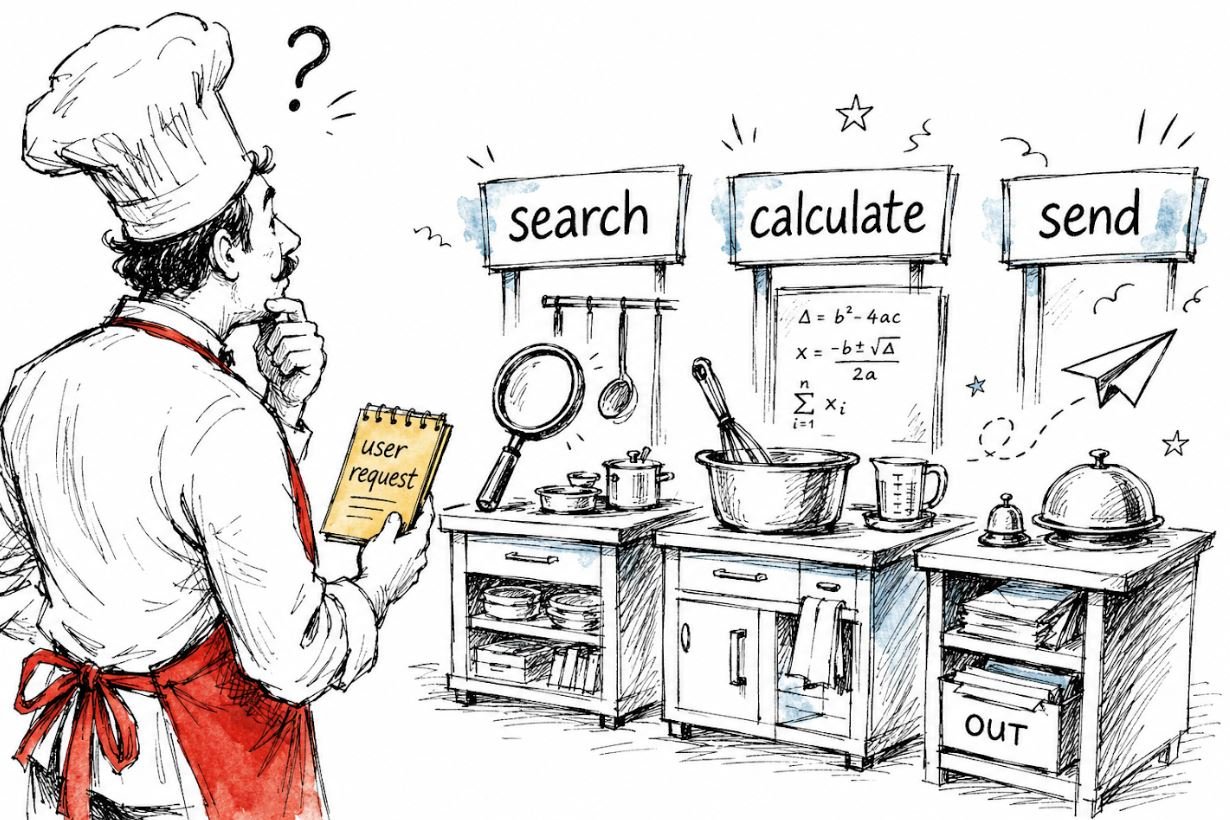
Tool calling (also called function calling) is the mechanism by which an LLM can request the execution of external functions or APIs as part of generating its response. In other words, instead of just returning text, the model can execute a specific function with specific arguments, as a response to the user’s request.
The key thing to understand here is that the model itself does not execute the tool. It only decides which tool to call and with what arguments. The actual execution of the selected tool happens in our own code, in which the request to the AI model is included. We then feed the tool’s result back to the AI model, which uses it to generate a final response to the user.
This is the tool calling loop, which includes the following steps:
- The user submits a message
- The AI model takes the message as input and produces an output, which is essentially a decision on which tool to utilise and with which arguments
- The model’s response containing the tool selection and respective arguments to be used is passed back to the code. The code – with no involvement of the AI model – executes the selected tool with the selected arguments. This execution produces some kind of result (e.g., a calculation, information obtained from an API, etc.), and this result is then passed back to the AI model.
- The AI model takes as input the result of the tool and produces a final response to the user based on that.

Again, the model generates a tool call, not a tool execution. The two are very different things, and conflating them is one of the most common sources of confusion.
But what exactly is a tool call? In practice, it means that the model returns a structured, machine-readable response using Function Calling, as we saw in the previous post. In this response, content is None; there is no natural language answer, just a structured instruction indicating which tool to call and with what arguments. It is only after we execute the tool and pass the result back that the model generates an actual text response for the user.
But let’s see this in practice!
We’ll start with a simple example using just one tool and one call, and then progressively build up to some more interesting scenarios.
1. A single tool: weather API
I think that the most common example of tool use with AI that comes to mind is a weather API (the cornerstone of custom, live data), so let’s imagine we’re building a weather assistant. In particular, we want to create a mechanism in which the user asks about the weather, and instead of just letting the AI model make something up (which the model would very happily do 🙃), we want it to call a real weather function and get actual data about the weather from somewhere else, outside the LLM. To get the weather data, I will be using Open-Meteo, a free, open-source weather API that happily requires no API key.
To use a tool, we have to initially declare it in tools.
from openai import OpenAI
import json

client = OpenAI(api_key="your_api_key")

# Step 1: define the tool
tools = [
    {
        "type": "function",
        "function": {
            "name": "get_current_weather",
            "description": "Get the current weather for a given city",
            "parameters": {
                "type": "object",
                "properties": {
                    "city": {
                        "type": "string",
                        "description": "The name of the city, e.g. Athens"
                    },
                    "unit": {
                        "type": "string",
                        "enum": ["celsius", "fahrenheit"],
                        "description": "The temperature unit to use"
                    }
                },
                "required": ["city"]
            }
        }
    }
]
Notice how the actual tool to be used (the weather API) is mentioned nowhere up to this point. Instead, the model decides which tool to call based on three things: the function description (“Get the current weather for a given city”), the parameter descriptions (“The name of the city, e.g., Athens”), and the enforced schema. It is purely from this information that the model figures out whether this is the right tool to call for a given user message and with what arguments. Thus, writing clear and accurate descriptions when defining our tools is of key importance for the model to successfully identify and call the right tool based on the user’s input.
So, after we have defined the tools variable, we can then make a request to the AI model:
# Step 2: send the user message along with the tool definition
messages = [
    {"role": "user", "content": "What's the weather like in Athens right now?"}
]

response = client.chat.completions.create(
    model="gpt-4o-mini",
    tools=tools,
    messages=messages
)

print(response.choices[0].message)
Here’s what happens when we make this request. The model reads the user’s message, “What’s the weather like in Athens right now?”, and understands that the available tool get_current_weather can help answer this query with real, live data. So, rather than generating a text response directly, it decides to call the tool first. More specifically, the model’s response at this point looks like this:
ChatCompletionMessage(
    content=None,
    role='assistant',
    tool_calls=[
        ChatCompletionMessageToolCall(
            id='call_abc123',
            type='function',
            function=Function(
                name='get_current_weather',
                arguments='{"city": "Athens", "unit": "celsius"}'
            )
        )
    ]
)
Notice how content is None, because the model isn’t returning a text response, but a tool call. Now it’s our job to actually execute the tool, the model selected, and return the result back to it. In our case, this is going to be making the API request to the weather API, using the arguments (that is, the city and unit of measurement) provided in the AI model’s response:
# Step 3: execute the tool using the Open-Meteo API
import requests

def get_current_weather(city: str, unit: str = "celsius"):
    # geocode the city name to coordinates
    geo = requests.get(
        "https://geocoding-api.open-meteo.com/v1/search",
        params={"name": city, "count": 1}
    ).json()
    lat = geo["results"][0]["latitude"]
    lon = geo["results"][0]["longitude"]

    # fetch current weather
    weather = requests.get(
        "https://api.open-meteo.com/v1/forecast",
        params={
            "latitude": lat,
            "longitude": lon,
            "current": "temperature_2m,weather_code",
            "temperature_unit": unit
        }
    ).json()

    temp = weather["current"]["temperature_2m"]
    return {"city": city, "temperature": temp, "unit": unit}

# extract the tool call from the response
tool_call = response.choices[0].message.tool_calls[0]
arguments = json.loads(tool_call.function.arguments)

# call the actual function
weather_result = get_current_weather(**arguments)
we can then append the tool’s result to the message history and then send everything back to the model:
# Step 4: add the assistant's tool call AND the tool result to the message history
messages.append(response.choices[0].message)  # important: append the tool call first
messages.append({
    "role": "tool",
    "tool_call_id": tool_call.id,  # links the result back to the specific tool call
    "content": json.dumps(weather_result)
})

# Step 5: send everything back to the model for a final response
final_response = client.chat.completions.create(
    model="gpt-4o-mini",
    tools=tools,
    messages=messages
)

print(final_response.choices[0].message.content)
And now, we finally get a proper text response:
It's currently 29°C in Athens. Sounds like a great day to be outside!🍨 DataCream is a newsletter offering stories and tutorials on AI, data, and tech. If you are interested in these topics, subscribe here!
2. Letting the model choose from multiple tools
Now let’s take a look at a more realistic example. In a real-world agentic application, the model typically has access to not one, but multiple tools, and as a result, it needs to figure out which one (or ones) need to be used based on what the user is asking.
Let’s extend our initial weather API example by adding an additional tool for currencies. For this, we’ll use Frankfurter, a currency API providing European Central Bank daily rates, again with no API key requirement. So, let’s update our tools variable by adding a second tool for converting currencies:
tools = [
    {
        "type": "function",
        "function": {
            "name": "get_current_weather",
            "description": "Get the current weather for a given city",
            "parameters": {
                "type": "object",
                "properties": {
                    "city": {"type": "string", "description": "The name of the city"},
                    "unit": {"type": "string", "enum": ["celsius", "fahrenheit"]}
                },
                "required": ["city"]
            }
        }
    },
    {
        "type": "function",
        "function": {
            "name": "convert_currency",
            "description": "Convert an amount from one currency to another",
            "parameters": {
                "type": "object",
                "properties": {
                    "amount": {"type": "number", "description": "The amount to convert"},
                    "from_currency": {"type": "string", "description": "The source currency code, e.g. USD"},
                    "to_currency": {"type": "string", "description": "The target currency code, e.g. EUR"}
                },
                "required": ["amount", "from_currency", "to_currency"]
            }
        }
    }
]
And also set up the actual convert_currency function using the Frankfurter API:
def convert_currency(amount: float, from_currency: str, to_currency: str):
    response = requests.get(
        f"https://api.frankfurter.dev/v2/rate/{from_currency}/{to_currency}"
    ).json()

    rate = response["rate"]
    converted = round(amount * rate, 2)
    return {
        "amount": amount,
        "from_currency": from_currency,
        "to_currency": to_currency,
        "converted_amount": converted,
        "rate": rate
    }
In this way, the model can handle a much wider range of user requests; it can now also answer about currencies, on top of the weather 😋. Now, if the user asks “What’s the weather in Athens?”, the model should call get_current_weather. If they ask “How much is 100 USD in EUR?”, it should call convert_currency. And if we ask something irrelevant to both weather and currencies for which neither of the available tools can help, the model will simply respond in text without calling any tool at all.
But let’s see this in action:
messages = [
    {"role": "user", "content": "How much is 200 USD in EUR?"}
]

response = client.chat.completions.create(
    model="gpt-4o-mini",
    tools=tools,
    messages=messages
)

tool_call = response.choices[0].message.tool_calls[0]
Let’s take a glance at the response:
print(tool_call.function.name) from which we get convert_currency. So, the model understood that the question “How much is 200 USD in EUR?” is relevant to the convert_currency tool. Let’s also take a look at the arguments:
print(tool_call.function.arguments) from which we get
'{"amount": 200, "from_currency": "USD", "to_currency": "EUR"}'
So, the model correctly identifies convert_currency as the right tool and fills in the appropriate arguments, without us doing anything other than providing appropriate tool descriptions, and the user providing an appropriate message. This exact decision-making mechanism is what makes tool-calling the foundation of agentic systems.
3. Calling multiple tools at once
Another interesting tool calling scenario is that many models, like gpt-4o, can call multiple tools in a single response when the user’s request requires it. This is known as parallel tool calling.
For example, let’s imagine a scenario where the user asks in a single request something that requires the use of both the get_current_weather and convert_currency tools to obtain the required info:
messages = [
    {"role": "user", "content": "What's the weather in Athens and how much is 100 USD in EUR?"}
]

response = client.chat.completions.create(
    model="gpt-4o-mini",
    tools=tools,
    messages=messages
)

for tool_call in response.choices[0].message.tool_calls:
    print(tool_call.function.name)
    print(tool_call.function.arguments)
In this case, the response we get is the following:
get_current_weather
{"city": "Athens"}

convert_currency
{"amount": 100, "from_currency": "USD", "to_currency": "EUR"}
Notice how both tools are called in a single model response. We can then execute the respective tools with the provided arguments and pass back the tool results to the model together. This is much more efficient than sequential calls, and it’s how more advanced agents handle multi-part requests.
On my mind: So, what makes this agentic?
One thing that has always gotten on my nerves is the term “agentic” being slapped on everything. Agents, agentic workflows, anything originating from the word agent is very sexy nowadays, but as you may have already discovered yourself, not everything sold as agentic really is.
So let’s take a step back and think about what an agent actually is in the first place. At its core, an agent is something that perceives its environment, processes that information in some way, has a goal, and then decides what action to take in order to achieve it. Think about what our tool calling mechanism is doing: it perceives the tools available, decides which one is appropriate to address the user’s request (if any), and passes that decision on to the rest of the code for execution. That, in its simplest form, is agency.
In real-world agentic applications, the tool calling loop runs not one but multiple times, with the model using the results of one tool call to decide whether, and which, tool to call next. This is sometimes called a ReAct loop (Reason + Act), and it’s what allows agents to handle complex, multi-step tasks that can’t be solved in a single call.
Ultimately, what I find most fascinating about tool calling is how it changes the nature of what an LLM is. Up to this point, a language model was essentially a very sophisticated input-output function, which takes text as input and generates text as output. But with the tool calling, we gain access to an endless collection of additional functionalities, which we can combine with the reasoning power of the LLM to create systems that are far more capable than either alone.
✨ Thank you for reading! ✨
If you made it this far, you might find pialgorithms useful — a platform we’ve been building that helps teams securely manage organizational knowledge in one place.
Loved this post? Join me on 💌Substack and 💼LinkedIn
All images by the author, except mentioned otherwise.